

Propertybase Login Box Follow

The purpose of the Propertybase login box. The login box firstly lets Propertybase know that you are connected to our systems.
NOTE: The login box must not be removed. This system is directly connected to User Authentication. If the login box is removed, it thinks the user is not at the company anymore and cannot authenticate correctly.
Clients also need to allow for pop-ups, this is for the authentication.
Propertybase login box
The new Quick Links include:
Release Update Notes: This link takes you to the release notes.
Help Center: This option takes you directly to the Help Center.
A Lead Routing Toggle: To turn Lead Routing on and off.
The Latest Propertybase Version Installed and Connected to Propertybase Services lights remain the same, they will appear green if they are up to date and red if they need updating or a connection refreshed. You can select these if they are red and allow the system to walk you through the update or refresh of services.
If you are a CRM (Propertybase) only Org your login box will look similar to this:
Some Configuration Required
Some configuration will be needed if the login box has been removed from the Home page
- From the homepage, click Setup and then Edit Page.
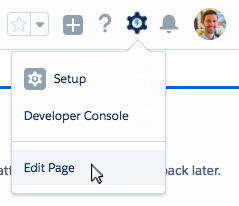
- In the middle or on the right of the screen, click on the Login box.
- On the right side of the screen, update the height to 250.
- Click Save.
- Click Back.
All done! You now have the latest and greatest login box.
Comments
0 comments
Article is closed for comments.